
QFlow Fall 2026 Product Notes
How are we doing against the plan? A simple question, until you have several businesses, different systems, and a hiring plan that keeps moving.
Our Fall releases bring more of that picture together in QFlow: where growth is coming from, whether the team can deliver the plan, and what that growth costs.
Multi-entity Support
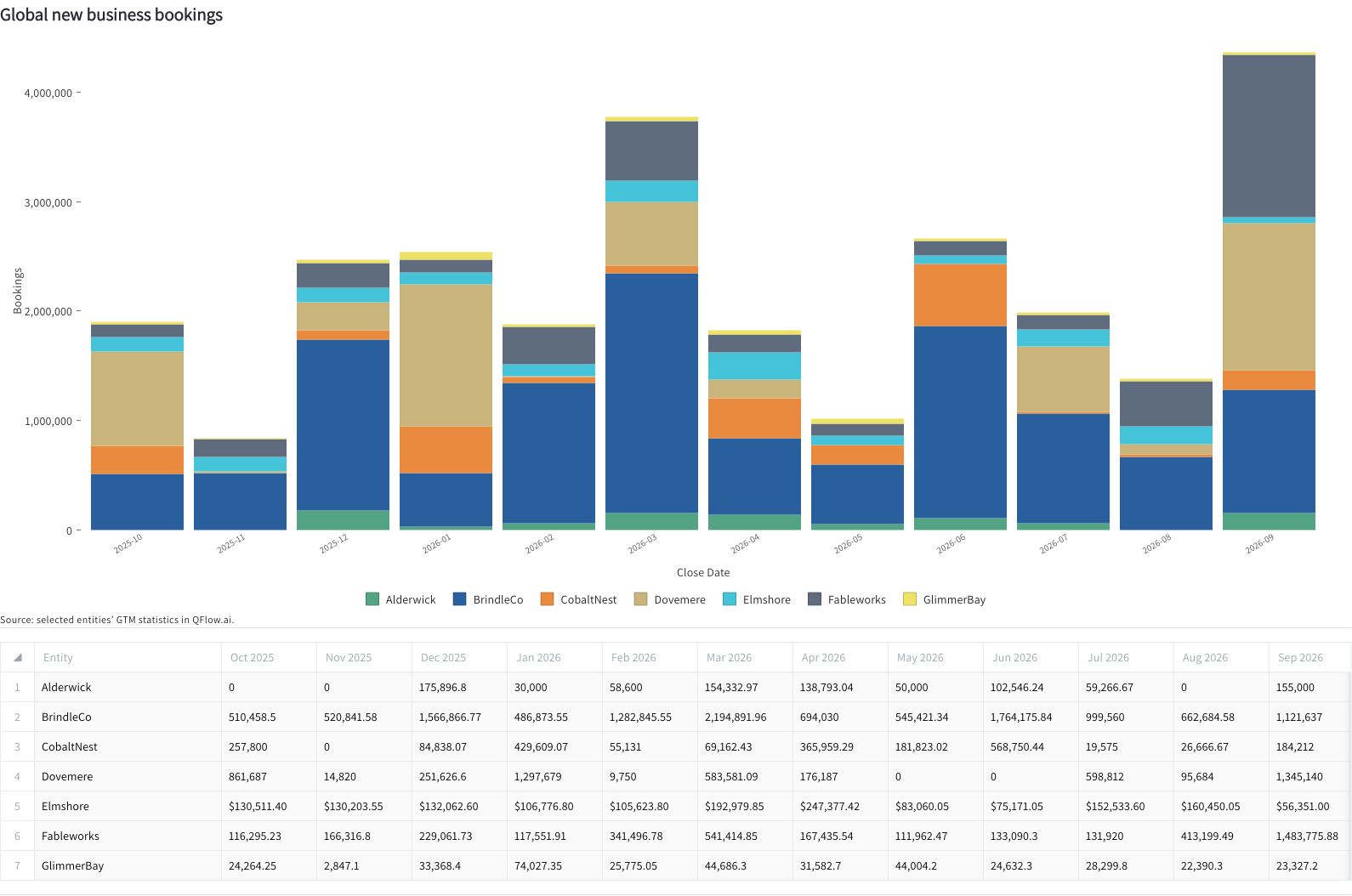
Multi-entity support is publicly available. Businesses can keep different CRMs, ERPs, and revenue models while management reviews performance across the group.
Browse Business Digests by business unit, address data hygiene where the issues originate, and roll up ARR waterfalls, booking forecasts, and revenue projections. See what each business contributes without waiting for a systems-consolidation project.
More on revenue across businesses.
AI-assisted Imports and Workforce Planning
We’ve rolled out AI-assisted imports for employee censuses, quotas, compensation, and expenses. Use the spreadsheets you already have, without reformatting them for QFlow.
Bring in the targets the team agreed to, see who’s employed today, and account for future hires and their expected start dates. Authorized reviewers can include compensation in that planning work.
A target backed by experienced sellers is a different proposition from one that depends on hiring and ramping a new team. Put the targets alongside quota and productivity data, and you have a better basis for deciding whether the plan holds up.
Renewal Matching
Teams spend too much time managing renewal opportunities and cleaning up the records behind them. Renewal Matching surfaces expected renewals that haven’t reached the pipeline and connects renewals to the contracts they replace, including when one renewal replaces several earlier contracts. You can investigate retention changes without tracing every relationship by hand.
Conversions
This Fall, Conversions adds custom events from Salesforce, source evidence for individual metrics, and comparisons that account for how long prospects have had to convert.
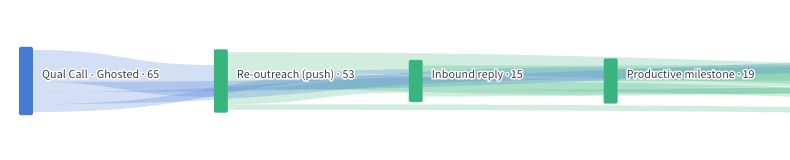
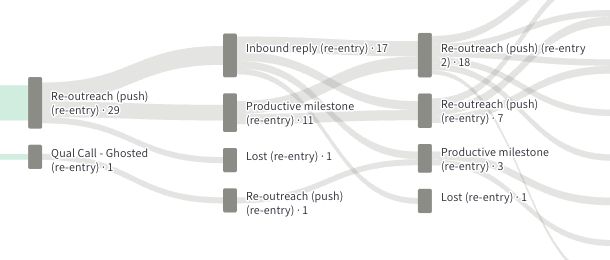
A ghosted qualification call does not always end the conversation. The saved analysis below follows renewed outreach, inbound replies, and productive conversations through to opportunity outcomes. Its paths retain repeated or out-of-order steps, so the team can see what happened after the first attempt.
Inspect the underlying records to investigate weak handoffs and follow-up. Compare programs and periods with timing in view before deciding where to invest. Recent prospects need a fair window to convert.
The saved dataset and supporting records are available through MCP, so Claude or Codex can work from the same analysis.
Explore the paths behind the outcome.
Department Spend, EBITDA, and Rule of 40
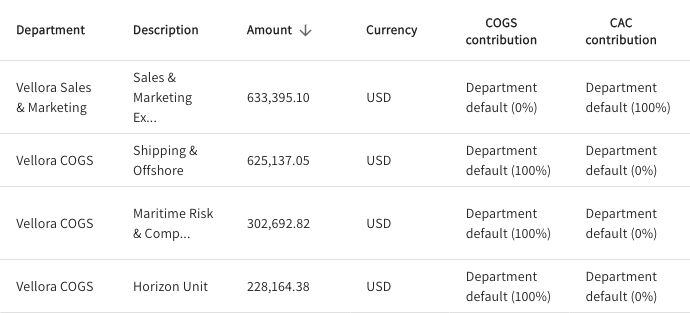
For expenses, the new import workflow brings spreadsheets and P&L files into Department Spend. Review where expenses belong and how shared spending contributes to acquisition costs before using it in the analysis.
We’ve also added EBITDA, adjusted EBITDA, and Rule of 40. You can examine growth alongside earnings and margin, including the accounts and adjustments behind the figures.
That puts the hiring plan, the growth target, and the cost of delivering both into the same discussion.
Recipes and MCP Datasets
Once you’ve agreed on the analysis, keep it. Recipes save the analytical steps, and you can compare proposed changes before applying them. How Recipes Keeps a Recurring Analysis Consistent explains the approach.
Revenue and saved-conversion datasets are available through MCP, so you can use them in Claude or Codex as well as QFlow. Desktop and Organization Skills, introduced in August, carry those results and your team’s instructions into recurring work. Revenue exports keep the same result available for spreadsheet and board preparation.